The relationship layer inside Gmail

Give your inbox cachet.

Cachet Inbox keeps the pipeline right in the thread you are reading, and reads whether a message landed from the one signal that cannot be faked: a real reply. Next up: a warmth layer for who has gone cold and what you promised them.

Lives in one Gmail panel · Your mail never routes through our servers · Part of the Cachet suite
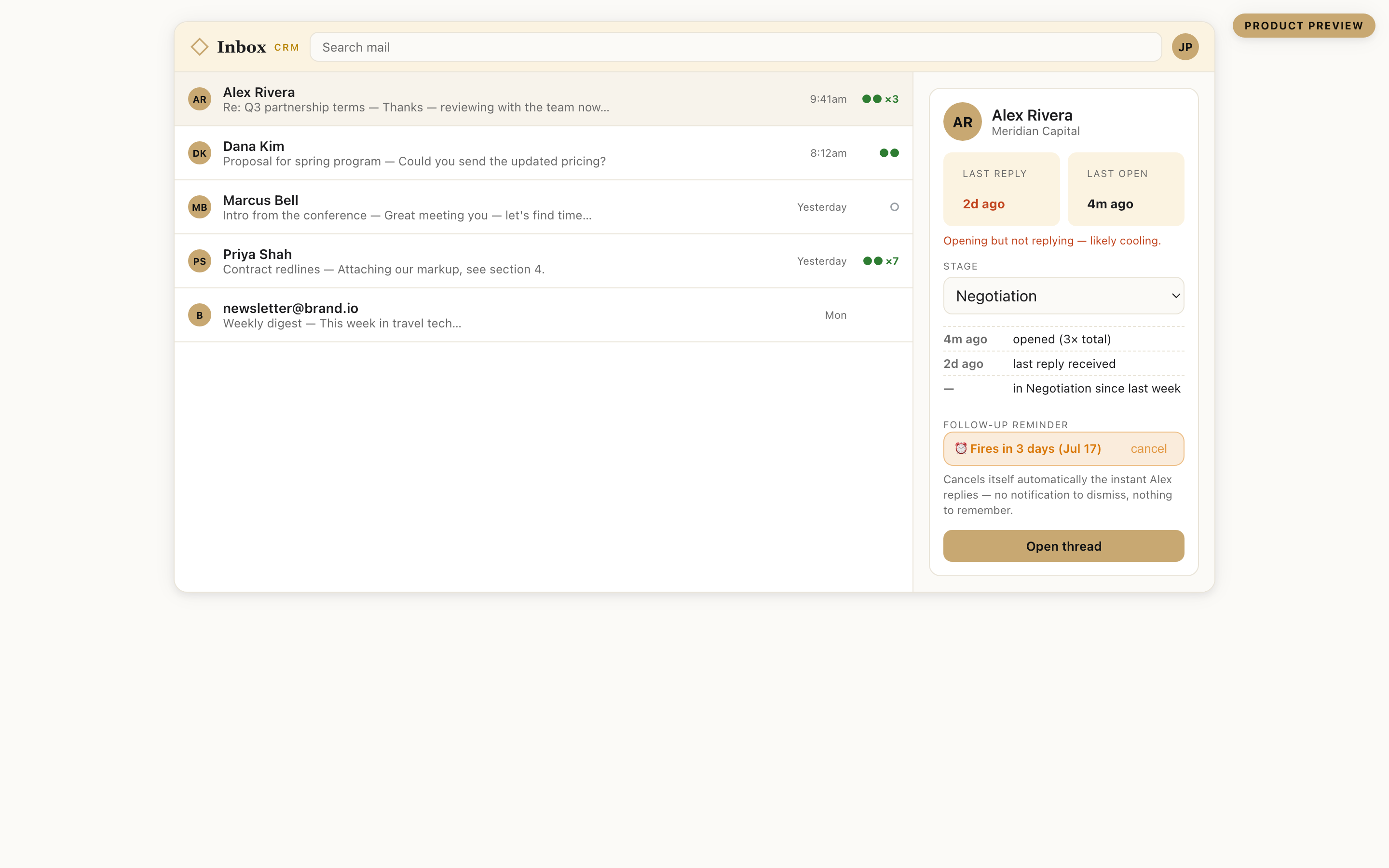
The Cachet Inbox panel beside a Gmail thread: Alex Rivera at Meridian Capital, last reply two days ago, opening but not replying, stage set to Negotiation, and a follow-up reminder that cancels itself when he replies.
The panel beside a Gmail thread: the send rail, the pipeline, and the reminders it carries are live in code today, and the warmth read beside them is next. A design preview, not a screenshot.

The truth about whether it landed.

Apple Mail preloads every tracking pixel at delivery regardless of whether anyone opens the message, and Gmail proxies and caches images so a repeat open often never refires. A meaningful share of recorded opens never reflect a person looking at anything, and French and Italian data-protection regulators now require consent before a behavioral pixel fires. Cachet Inbox leads with the signals those changes cannot degrade.

The old way
✓✓ Opened 12×
Counts Apple pre-fetches, security scanners, and your own re-reads as real. A confident number with no way to tell what was a person.
Cachet Inbox
Landed: reply in two days
A real reply is the primary read, and Apple and Gmail cannot distort it. Calendar behavior is being built to join it. Filtered opens stay as a labeled secondary hint rather than a certainty.
Reply detected Meeting booked (building) ☉ Filtered open (secondary)

We tell you the truth about what we cannot see. Pixel opens are disclosed, off by default, and always labeled with their reliability, so you never act on a number that is mostly machines. Reply detection already runs against real mail; calendar detection and continuous polling are still being built.

Who has gone cold, and what you owe them.

Relationship tools tell you a contact went quiet. Pipeline tools track the deal. No one puts both on the same thread today. Cachet Inbox already keeps the pipeline there, and is building the warmth read and the commitment field beside it: the last time you spoke, whether they are cooling, and the next step you owed them.

Going-cold detection (building)

Every contact will carry a last-touch date and a warmth read from the mail already flowing. The going-cold model runs today against real mail on the backend; the ones slipping away surfacing in the panel is next.

The pipeline in the thread

A stage and the deal history sit on the Gmail thread itself. No dashboard tab to open, no context lost switching apps.

The commitment you made (building)

A lightweight next-step field on each contact: what you promised, by when. The one thing a pipeline stage never captures.

One data spine across the suite

Card to Contacts to Calendar to Inbox.

A business-card app captures the contact and stops. A scheduler books the meeting and stops. The Cachet family covers the whole path: a card kept in Cachet Card lands in Cachet Contacts with its context attached, the follow-up lives here in Gmail, and Cachet Calendar books the meeting. Each product works alone, and the full picture lives at cachetcomplete.com.

Capture

Cachet Card

The first-touch. A card scan or tap becomes a real contact.

Memory

Cachet Contacts

Who they are and how you know them, kept current.

Booking

Cachet Calendar

The meeting, without the back-and-forth.

Follow-through

Cachet Inbox

The relationship, warm and answered.You are here

Everything a Gmail CRM should be. Lighter.

The parts a solo advisor, recruiter, or founder actually uses from a customer relationship management (CRM) tool, in one panel, opt-in everywhere.

Honest send signals

Real replies read today, with filtered, disclosed opens as a labeled secondary hint. Calendar behavior joining replies as the primary read is being built.

Reply queue by engagement

Your day sorted by who is most engaged right now, so you see who to answer first instead of digging through time order.

The reminder that cancels itself

Set a follow-up on a thread. It clears itself when the reply arrives, the next time the thread is in front of you. Nothing to dismiss.

Mail merge and sequences

Personalized batches with a delivery calendar that respects Gmail's limits. Every step stops the instant somebody replies.

One built-in report

Deal count, reply rate, and a cold-deal count (opened, no reply) up top, a stage funnel underneath. The view most people need, nothing to configure.

You are in control

Toggle every surface. Suppress your own opens. No floating bubbles, no pop-ups, no nagging.

Why people switch.

The category splits into pipeline tools with no warmth layer and warmth tools with no pipeline. Cachet Inbox already has the pipeline inside Gmail and is building the warmth layer beside it, at a solo-professional price. Here is the honest picture, including where the others still win.

 Cachet InboxStreakClozeSuperhumanAttio
Warmth layer (who is cooling)buildingNoNoNo
Pipeline / deal recordNorents HubSpot
Both in one productbuildingNoNoNoNo
Honest send signal (reply + calendar first)buildingpixel onlypixel onlypixel onlyNo
Never auto-merges your contactsforced mergeno dedupe
Solo-professional pricing$49/seat$30 to $40$44–99/seat
Sanctioned Gmail integrationbuildingDOM injection
MCP + llms.txt for AI agentsbuilding, entry tierfreetop tier onlyBusiness only
From our July 2026 competitor atlas of vendor pages and public reviews. "No" means not offered, or not found in that scan. Where a rival is stronger, the table says so.

What is live today, and what is next.

We would rather show you the real line than a roadmap dressed as a product. This is where the build stands.

Live in code today

  • Server-side tracked sends with a real open classifier (real vs Apple prefetch vs a scanner bot vs a suspiciously fast open), with your own re-reads filtered out separately.
  • The pipeline in the thread: pipelines, deal boxes, stages, and notes.
  • Reply queue by engagement, hottest threads first.
  • The self-canceling reminder, one built-in pipeline report, and a fast mobile page.
  • Mail merge with a one-click unsubscribe and a suppression list.
  • Flat tiers enforced in code. The prices below are the working numbers while the pricing review completes.
Your contacts are yours, and we never quietly rewrite them.

Cloze, the relationship tool in this category with the closest warmth layer, merges contacts automatically by its own account, with data loss reported often enough to be the most frequently cited complaint across G2, TrustRadius, and Capterra. Cachet Inbox never merges a contact without asking you first. Your data hygiene stays in your hands.
Who this is for, and who it is not.

The scope is deliberate. A tool that tries to serve a 40-person sales floor and a solo advisor equally ends up shaped for the floor.

The advisor with 200 relationships

Your pipeline is real but it is not a forecast meeting. What you need is to know who has gone quiet and what you last promised them, without leaving the thread where that promise was made.

The recruiter running two searches

Candidates and clients live in the same inbox and cool at different speeds. The queue puts the ones still moving in front of you, and a reminder that cancels itself means an answered candidate stops chasing you back.

The founder doing their own outreach

Forty introductions, paced under Gmail's cap, with unsubscribes that stick and an honest read on whether any of it landed. No sales operations person required to keep it running.

Who it is not for, stated plainly: a sales team that needs roles, forecasting, and territory rules run by a sales-operations function. That product exists, and it costs more per seat than Cachet Inbox costs one professional in total. The Teams tier below is central billing for a small partnership working the same way, not a sales floor.

How it works.

Three steps, and you control every piece of the path.

The extension goes into Chrome

Cachet Inbox is a Chrome extension. It adds the relationship panel to Gmail and nothing else to your browser.

It points at your own backend

Give it a backend address and a token. The backend is a Cloudflare Worker that holds your pipelines and your tracked sends. The mail-merge pacing queue lives in the extension itself, run by Chrome's own alarm scheduler and saved to the browser's local storage, so a sleeping laptop or a browser restart does not lose it. While you are evaluating the backend, you can run the identical one on your own machine against the same endpoints, so nothing leaves your laptop until you decide it should.

Gmail looks different

Open a thread and the panel is beside it: the stage, the deal box, the notes, and the follow-up you set. The Reply Queue joins your left-hand navigation.

A day inside the panel.

Four moments from one working day, each of them something the panel does today.

Morning, sorted by engagement

Open the Reply Queue instead of scrolling in date order. It ranks threads by engagement, so the people already moving sit at the top and the cold ones wait.

The proposal that only a scanner opened

A proposal from Tuesday shows an open. The classifier reads the user agent and how fast it fired after send, and calls it an automated scanner rather than a person. You do not make the follow-up call on a false signal.

The document you promised by Friday

You set a follow-up on the thread when you made the promise. When the client replies, the reminder cancels itself. There is no notification to dismiss and nothing to remember.

Forty introductions that pace themselves

Queue 40 introductions and the scheduler paces them under Gmail's own daily cap. The queue is alarm-driven and survives a restart, so it picks up where it stopped and finishes across days.

What it can and cannot see.

The strongest privacy claim here is one you can check yourself, in about 10 seconds.

Cachet Inbox asks Google for exactly two permissions: gmail.send and userinfo.email. You see both on Google's own consent screen when you connect, and Google lists what you have granted in your account's security settings. Chrome separately shows the extension's browser permissions before you install it. All of it is checkable rather than promised.

It does not request gmail.readonly or gmail.modify. Without those, it cannot read your mailbox through Google's API at all: not your history, not a search across old messages, not an archive it keeps somewhere. Your mailbox is never synced to a server and never stored on ours.

What the panel reads is the thread you have open, in your own browser, on your own screen. What it sends goes through Gmail's own API, signed in as you, which is why the send permission is there at all. The pipeline, the stages and the tracked-send records live in the backend you pointed it at.

Reply detection works the same way: it reads who last wrote in the thread you have open, straight from Gmail's own rendered page, not a mailbox-wide API call. That is also why it is reliable for the thread in front of you today; catching a reply on a thread you are not currently looking at, so a reminder can clear itself in the background, is the continuous-polling piece still being built.

The counts below come from tests that can fail.

Numbers about the code, stated as numbers about the code.

Forty-five of 45 on the merge pipeline

Template substitution, unsubscribe link generation, and the suppression list that has to be honored on every future send.

Twenty-three of 23 on the send queue

Crash recovery, delivery pacing under the daily cap, and a schedule that persists across restarts and across days.

Eighteen of 18 on the open classifier

Bot user agents, Apple Mail Privacy Protection pre-fetches, opens logged suspiciously fast after send, and your own re-reads filtered out separately: the four ways a recorded open turns out not to be a person you are chasing.

Two adversarial security review rounds were applied and verified, with 16 findings fixed across both. A test count is evidence about how the code behaves under the conditions it tests, and it is not a promise about your inbox: what happens to a message after it leaves Gmail depends on filters and servers nobody here controls.

Coming from Streak.

Leaving a tool you have used for years is work. Here is exactly how much.

A history importer ships with the product. It is a command-line tool with two ways in: a pipeline exported from Streak as a Comma-Separated Values (CSV) file, which needs no key, or the Streak API with your own key, which carries more fidelity. It runs as a dry run by default and prints what it would create, so you see the whole import before anything is written. It only inserts, and never deletes.

What moves: your pipelines, and your deals with their titles, their stages, and a contact address on each. Everything else in an exported row is carried across as a field on the deal rather than being dropped. What you should expect to redo by hand: anything Streak was doing for you beyond the record itself, and a pass over the imported stages to check they landed where you meant.

Streak has the pipeline and no warmth layer, at $49 per seat. Cachet Inbox already has the pipeline, is building the warmth layer beside it, and never merges a contact without asking you first.

What is next.

The line between shipped and next, before you ask.

A sanctioned Workspace add-on for the sidebar

Today the in-thread sidebar rides InboxSDK, a third-party framework for building inside Gmail. A sanctioned Google Workspace add-on is being built to sit alongside the server rail, which already is sanctioned.

The live Gmail surface is the piece tests cannot settle

The pipelines, the queue and the classifier are covered by the suites above. What a real Gmail window does with the panel has to be seen in a real Gmail window, because it depends on a page Google keeps changing.

Buying, today

The prices above are the numbers we intend to charge, and today every pricing button opens an email straight to us.

The warmth read is next

Reply and calendar behavior becoming the primary landed signal, with opens demoted to a labeled secondary hint, is being built. What you get today is the pipeline in the thread, the Reply Queue, the self-canceling reminder, mail merge with scheduling, and tracked sends with the honest open classifier.

Priced for one relationship-focused professional.

Anchored to what an executive already pays for a beautiful inbox, not to a $10 personal CRM. Start free, upgrade when the relationship layer becomes how you work. Prices shown billed annually.

Free

$0

Forever, no card

  • Inbox context + reply queue
  • Limited tracked sends
  • One pipeline
  • "Powered by Cachet" tag
Get started
Recommended

Pro

$34.99/mo

Billed annually; $44.99 month to month

  • Pipeline in the thread
  • Honest open classifier
  • Mail merge + sequences
  • Self-canceling reminders
  • Warmth nudges + full contact timeline (building)
Start Pro

Cachet Complete

$49.99/mo

The whole suite, one subscription

  • Inbox, Cal, Card, Contacts
  • Every Pro feature
  • Consolidated billing across the suite
  • Replaces four subscriptions
Get Complete

Cachet Concierge

$99.99/mo

Complete, with concierge service

  • Everything in Complete
  • White-glove setup
  • Feature requests, reviewed personally
Talk to us
Teams: everything above, per seat, with an admin console and central billing, at $74.99 per seat billed annually (three-seat minimum). The prices are the working numbers while the pricing review completes, and the final schedule is published here before anyone pays. Each button opens an email straight to us.

Questions, answered straight.

How is the tracking actually honest?

Opens are approximate by nature: Apple Mail preloads pixels, image proxies cache them, corporate scanners fire them. So Cachet Inbox leads with the signal those cannot fake: whether the recipient replied. A calendar-booking signal is being built to join it, and until then the classified, filtered open stays a labeled secondary hint. You get the truth instead of a hopeful green checkmark.

What makes it different from Streak or Cloze?

Streak has the pipeline but no warmth layer; Cloze has the warmth layer but no pipeline, and silently merges your contacts. Cachet Inbox already has the pipeline, is building the warmth layer beside it, never auto-merges, and prices for one professional rather than a sales team.

Does my mail go through your servers?

No. The panel runs in your browser and shows data for the thread you have open. Sends go through Gmail's own API, signed in as you. Your mailbox is never synced or stored.

Is it built on a sanctioned Google integration?

The server-side send rail already is. We are adding a sanctioned Google Workspace add-on for the in-thread sidebar rather than leaning on the fragile approach of injecting code into Gmail's Document Object Model (DOM), the technique Streak still uses. We name honestly where each piece stands.

Can an AI assistant read my relationships?

That is the plan, at the entry tier and ungated: a Model Context Protocol (MCP) server and a public llms.txt so an agent can see who is cooling and what you committed to. Streak and Attio already ship some form of it; Cloze and Superhuman gate it to a top or business tier. Ours is planned free at the entry tier, same as Streak's.

Do I have to run my own backend?

You run it, but you do not build it. The backend is a Cloudflare Worker that ships with the product: you deploy it to your own Cloudflare account, which is where your pipelines and tracked sends then live. The mail-merge pacing queue runs separately, in the extension itself, on Chrome's own alarm scheduler. While you are still deciding, you can run the identical Worker on your own machine against the same endpoints, so you can exercise the whole product before anything leaves your laptop.

What happens to a scheduled batch if my laptop sleeps?

The queue is alarm-driven and persists to disk, so a restart does not lose it. It resumes where it stopped and keeps pacing under Gmail's daily cap, finishing across days if the batch is large enough to need them. Crash recovery and multi-day persistence are two of the 23 checks in the send-queue suite.

Can I try the mail merge without connecting Google?

Yes. A simulate mode runs the whole merge pipeline, including the personalization and the suppression list, with no Google sign-in at all. It is how the pipeline is tested, and it is the honest way to see what a campaign would do before you authorize anything.

If someone unsubscribes, does it actually stick?

Every merge send carries the one-click List-Unsubscribe header and a footer link. An unsubscribed address goes onto a suppression list that is checked on every future send, in this campaign and every one after it. That behavior is covered by the merge-pipeline tests rather than left as a promise.

Will it merge my contacts without asking?

No, and this is deliberate: Cloze merges silently and loses data that way, with no setting to stop it. Cachet Inbox never merges a contact without asking you first.